
Free ATS CV Checker

Drop your CVin. We'll tell you what an ATS actually sees and the three things worth fixing first. No signup, no email.

  • Your CV is deleted after 24 hours
  • Email report to yourself
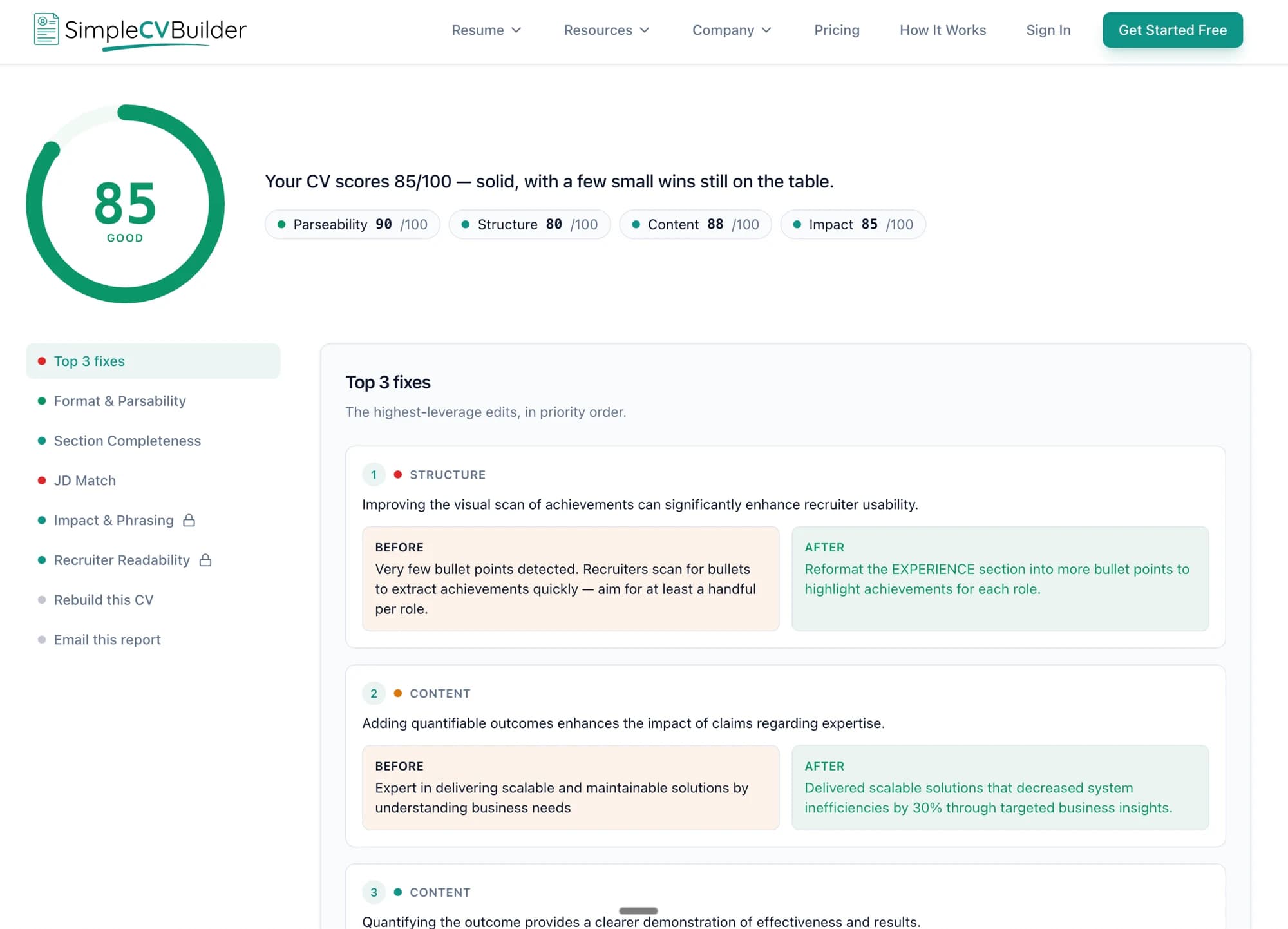
ATS report showing a CV scored 85/100 (good), with sub-scores and a list of three top fixes.
  • GDPR compliant
  • CV deleted after 24h
  • We never sell your data
  • PDF, Word or paste
  • Results in under 30 seconds

What you'll get

Concrete deliverables, not vague reassurance.

Your ATS score, broken down

Not just a number. You'll see how parseable, structured, and impactful your CV actually reads, separately.

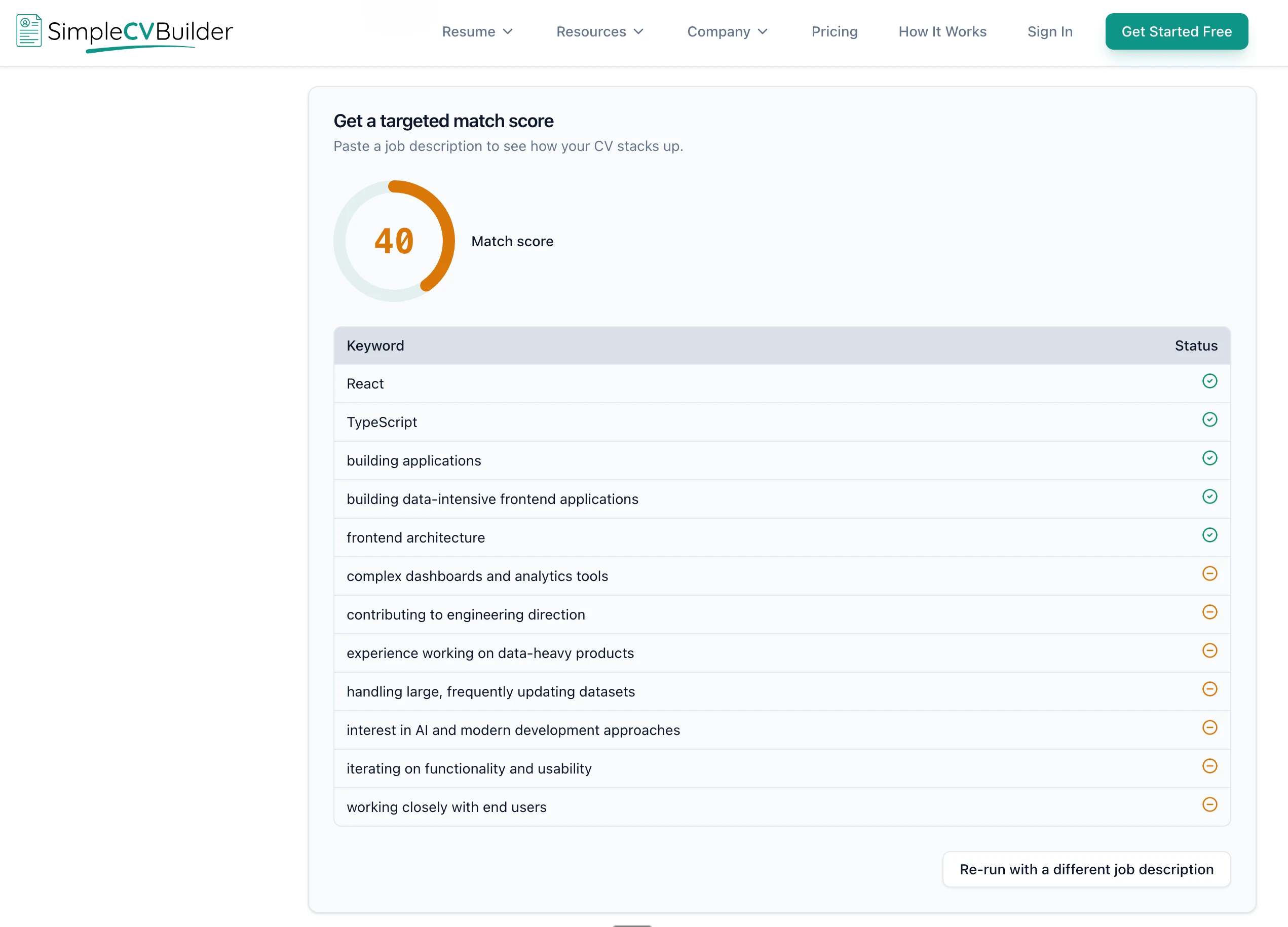
Targeted match score card from a sample report: a match score gauge on the left and a keyword table on the right comparing the CV against a pasted job description, with each keyword marked as found or missing.

Specific keyword gaps

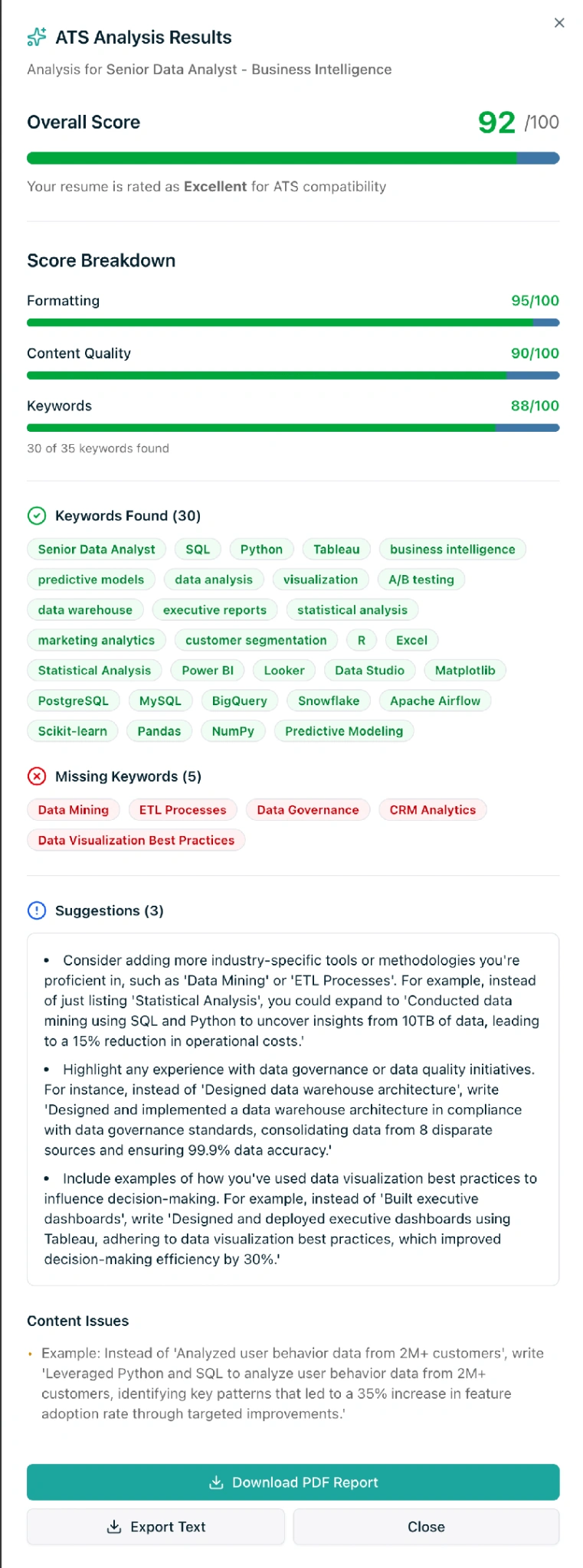
Paste any job spec. We'll show what your CVis hitting and what it's missing.

3 fixes with before/after

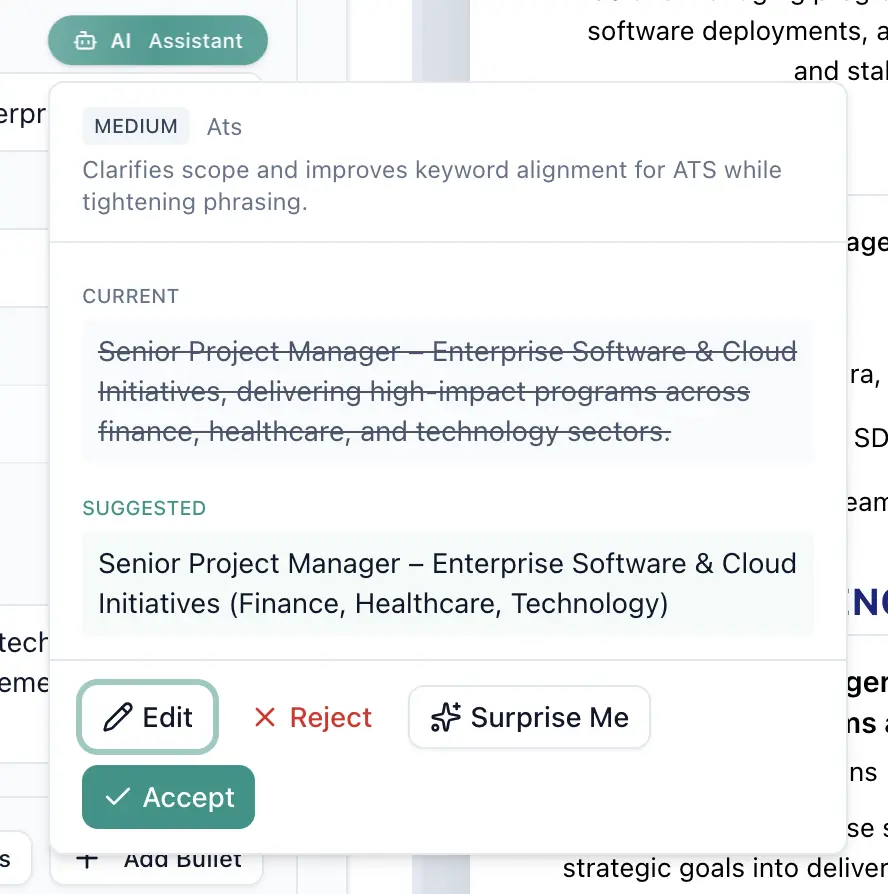
Real rewrites you can copy across, or refine in our editor.

How it works

Three steps. No signup. No nonsense.

  1. 1

    Upload

    Drop in your CV as a PDF or Word file, or paste the text. We never store the original.

  2. 2
    Step 2: Analyse

    Analyse

    We read it the way an ATS does. Same parsing, same blind spots.

  3. 3
    Step 3: Fix

    Fix

    Out comes a score, three fixes worth doing, and an optional JD match.

Here's what you'll see

The full score and three fixes are free. The rest unlocks when you sign up. No email scraping in between.

3 more sections unlock with a free signup

Scan your CV

Methodology

The rubric, the bands, and what we refuse to fabricate.

What we check

  • Parseability: does an ATS see your text?
  • Structure: sections, length, bullet density
  • Content quality: verbs, metrics, phrasing
  • Impact: leadership and ownership signals
  • Keyword match (optional, JD required)
  • Format: scanned PDFs, columns, contact info

How we score

Parseability runs first. If a section is unreadable, we tell you before scoring the rest.

Content quality uses the same rubric our paying users get inside the editor. Same model. Same calibration. We don't cheap out on the free check.

Score bands: 90+ excellent · 75-89 good · 50-74 needs work · below 50 critical.

What we don't fake

  • No fabricated review counts or aggregate-rating stars.
  • No “10,000+ scanned this month” tickers.
  • No invented expert bylines or staged testimonials.
  • No AI-generated portraits passed off as real reviewers.
Truth-only by default

An ATS CV checker shows you what an applicant tracking system is likely to pull out of your CV before a recruiter sees it. Ours is free, needs no sign-up and returns a score out of 100 with the three fixes worth doing first, usually in under 30 seconds. Here is what the score means and what to do next.

How UK ATS systems read your CV

An applicant tracking system is the software an employer uses to collect and search job applications. When you upload a CV, it usually converts the file to text and tries to sort that text into fields such as name, contact details, job titles, employers, dates and skills. If a detail never lands in a field, a search for it will not find you.

This step is called parsing, and it is where things go wrong. One system, Greenhouse, tells candidates that parsing "can make mistakes" and asks them to check the result before they submit.1

UK conventions help here. Prospects, the UK graduate careers site, recommends a CV of no more than two A4 pages and no photo unless you are applying for acting or modelling work.2 The National Careers Service says to leave out your age, date of birth, marital status and nationality.3 Fewer extras means less for a parser to trip over. Many public-sector roles go through their own services, such as NHS Jobs4 and Civil Service Jobs,5 so follow the advert: if it asks for a form, the form is what gets read.

What the ATS score measures

Your score is out of 100. It is a weighted average of four sub-scores, the same four chips you see at the top of your report: content counts for about 35%, parseability 25%, and structure and impact 20% each. We band the results as excellent (90 and above), good (75 to 89), needs work (50 to 74) and critical (below 50). If you paste in a job advert, you also get a separate keyword match score.

Parseability

This part is rule-based, with no AI involved. We check that the file has real, selectable text, whether it is a scan, how many columns it uses, and whether an email address and phone number can be found. If the file is a scan or scores below 50 here, we stop and report parseability alone, because grading text an ATS cannot read would be guesswork.

Structure

Structure checks that the sections a recruiter expects are there and named so a parser recognises them: a summary, experience, education and skills. It also looks at page count and at how much of your experience is written as bullet points rather than long paragraphs.

Content

Content is graded by AI against a fixed rubric, with worked examples of strong and weak bullet points. It looks at the verbs you open with, how many achievements carry a number, passive phrasing such as "responsible for", and generic claims. Any criticism has to quote a line from your CV.

Impact

Impact asks what changed because you were there. It looks for evidence of leadership and ownership, and at the level of seniority your CV signals. A CV can be perfectly readable and still score low here if every line lists duties rather than results.

The five ATS failures we check for first on UK CVs

Two-column layouts

Sidebars look tidy, but a parser can read across the page instead of down each column, so sidebar skills can end up stitched into a job title. Greenhouse lists columned layouts as a cause of failed parses.6 Our checker counts the columns in a PDF and flags anything over one. The fix is a single column, with skills in a section of their own.

Contact details in headers

It is tempting to put your name, email and phone number in the page header. Some parsers miss headers and footers, which can leave a recruiter with no way to reach you. Greenhouse lists contact details in a header, footer or text box as a known problem.6 Put them in the body of the first page as plain text.

Scanned PDFs

A scanned CV, or a PDF made from a photo, is a picture of text rather than text. A parser that cannot read images gets nothing from it, and Greenhouse lists image uploads among the causes of failed parses.6 Export a fresh PDF from Word or Google Docs, or upload the .docx file itself.

Non-standard section names

"My journey", "What I bring" and "Toolkit" read well to a person and badly to a parser looking for Experience, Education and Skills. Greenhouse lists unclear sections as a parsing problem too.6 Keep the personality for your personal profile and use plain headings for the sections themselves.

Missing role keywords

Recruiters often search parsed CVs for the skills and job titles in the advert. If the advert says "stakeholder management" and your CV only says "worked with senior teams", that search will pass you by. Paste the job advert into the checker and it counts how many of its keywords your CV covers and how many are missing. The list itself comes with a free account. Only add ones you can back up.

ATS CV checker or CV scanner: what is the difference

Very little. The two names describe the same kind of tool: something that reads your file the way a tracking system would and reports what it found. Neither is the employer's ATS, so treat the result as a rehearsal. What matters is what a tool checks. Ours starts with whether the text can be read at all, then grades structure, content and impact, and adds keyword matching when you give it a job advert.

What to do after your free ATS CV check

Start with the three fixes at the top of your report. They are ranked by how much they should lift your score.

  • Read our ATS guide for the reasoning behind each rule and a checklist to work through.
  • If the layout is the problem, choose one of our CV templates. Ten of the 12 are single column.
  • Create a free account to see the full fix list and keyword gaps. Sign up from your report and your CV opens in the builder, already filled in.
  • Applying for a particular job? Tailor your CV to it: paste the advert to see your match score before and after, plus the missing keywords. Free accounts get three runs a day.

Then run the check again: you get three uploads an hour.

Frequently asked questions

Is the ATS CV checker really free?

Yes. You get your score and your top three fixes with no sign-up, no credit card and no email address. A free account unlocks the full fix list and keyword gaps, and lets you open your CV in the builder.

Does this work for UK CVs?

Yes. The report uses CV wording, and the checks (whether the text can be read, whether your contact details can be found, whether the standard sections are there, and how your content reads) apply to any English-language CV. Nothing in the score penalises UK conventions such as A4 paper or leaving off a photo.

Which ATS do UK employers use?

There is no single answer. NHS roles in England and Wales go through NHS Jobs, and Civil Service vacancies are listed on Civil Service Jobs. Private employers choose their own systems, and the web address of the application page often shows which one. We have not found a reliable, current source for UK market share, so we do not quote one. The same basics help with all of them: one column, contact details in the body of the page, plain section headings and a text-based file.

Is a CV scanner the same as an ATS checker?

In practice, yes. Both names describe a tool that reads your CV the way an applicant tracking system would and reports what it finds. Neither is the employer's own system, so treat the result as a rehearsal. What differs between tools is what they check: ours tests whether the text can be read first, then grades structure, content and impact, and matches keywords if you paste in a job advert.

Is my CV ATS friendly?

Upload it and find out in under 30 seconds. The problems we check for first are multi-column layouts, scanned PDFs, contact details a parser cannot find, missing section headings and weak keyword coverage.

How does the free CV scanner work?

We extract the text from your PDF or Word file, or take the text you paste, and run a rule-based parseability check to see whether an ATS can read it. If it can, one AI pass pulls out the facts and a second grades them. Your score and top three fixes come back in under 30 seconds, and your CV and report are deleted after 24 hours.

Can I upload a Word document?

Yes. Upload a Word document saved as .docx, or a PDF, up to 5 MB. Older .doc files are not supported, so save them as .docx or PDF first. You can also paste your CV text instead.

What if my CV is a scan?

We can't read text from a scanned image. Paste the text instead, or upload a text-based PDF or a .docx file.

How many CVs can I check?

Three uploads an hour and ten a day from the same connection. That is enough to fix something, check again and compare.

Where does my CV go?

We never store the file itself. We keep the text we read from it, with your report, for 24 hours so you can come back to it, then delete both within the hour. We never sell or share your data. See our Privacy Policy for the full detail.

How accurate is the score?

The parseability part is rule-based, so the same file gets the same result. Content and impact are graded by AI against a fixed rubric with worked examples, and every criticism has to quote a line from your CV. Treat the score as a strong signal about how readable and convincing your CV is, not a guarantee.

Will my CV pass every ATS?

No checker can promise that. Systems differ, and employers set them up in different ways. What we measure is whether your text comes through cleanly and completely, which every system relies on, and how well it reads once it does.

Stop guessing. Score your CV.

30 seconds. No signup. No watermark.