
TL;DR. An ATS-friendly resume is a resume designed so Applicant Tracking Systems like Workday, Greenhouse, Lever, iCIMS, and Taleo can parse every field into clean structured data (name, title, dates, skills, bullets) before a recruiter ever reads it. Five pillars make a resume ATS-friendly in 2026: a single-column layout, standard section headings, a plain common font, real text instead of embedded images, and relevant keywords drawn from the job description. This guide walks through fourteen steps with examples and one comparison table, then flags the situations where senior and creative candidates can break the rules.
Last updated: April 2026.
What makes a resume ATS-friendly
Most rejections happen before a human sees the file. Jobscan's 2025 ATS Usage Report detected an Applicant Tracking System at 489 of 500 Fortune 500 companies (97.8%), with Workday leading at 39% market share and SAP SuccessFactors at 13.2%. 99.7% of recruiters use keyword filters inside their ATS to sort and prioritize applicants. The parse happens first, the scan happens second, and the interview decision happens third. A resume that looks beautiful but parses badly never reaches stage two.
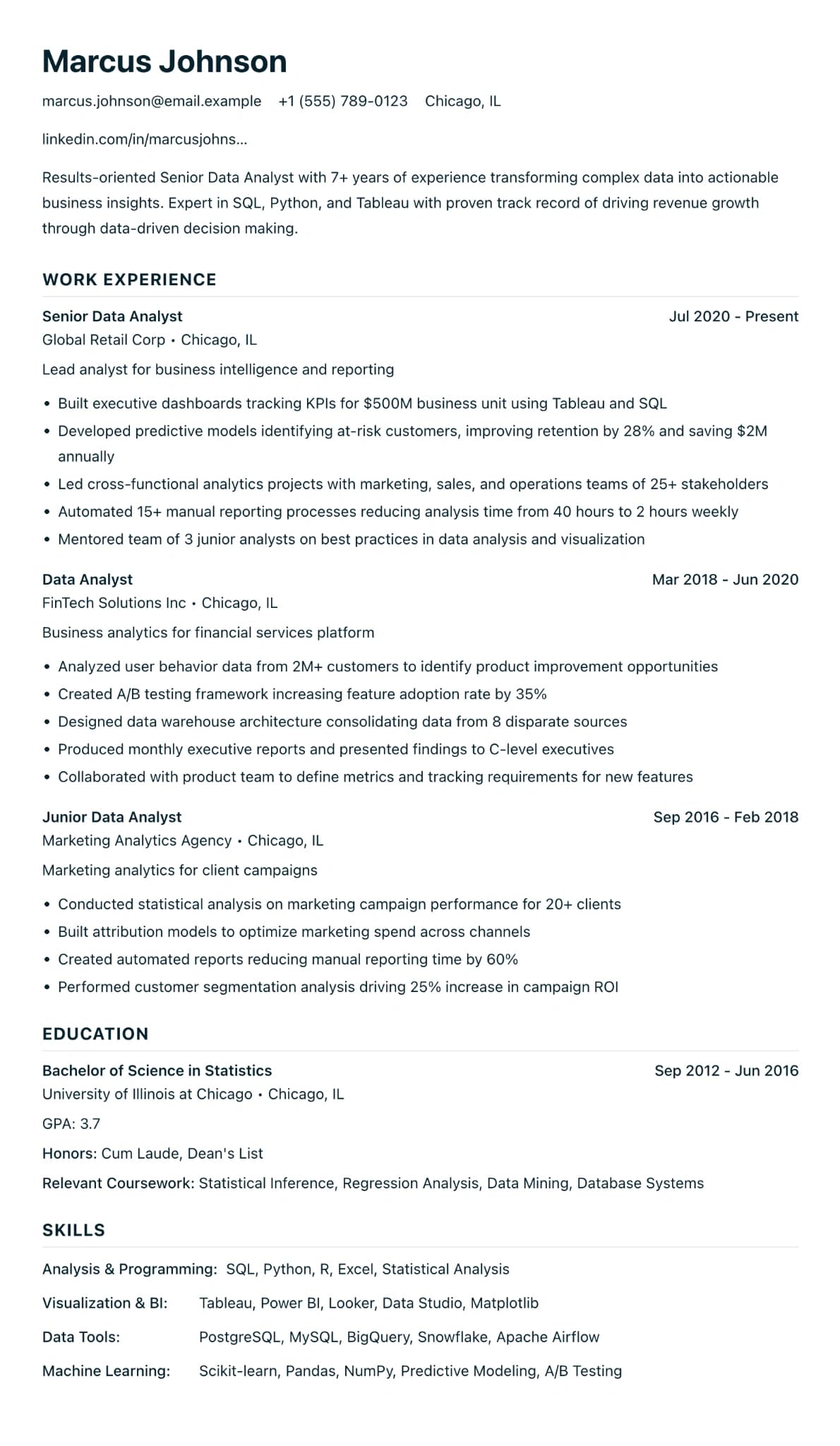
An ATS-friendly resume is the version of your resume that survives that first parse. It uses a single-column layout so the parser reads top to bottom in order. Standard section headings let the parser recognize what each block is, and a plain font means every character maps cleanly. Text lives as real text rather than images, so the parser actually finds words. Finally, it carries the keywords a recruiter is filtering on, so the file ranks above other parsed resumes. The steps below walk through each decision with a concrete example.
Step 1: Choose a single-column layout
A single-column layout is the single most important decision for ATS compatibility. Parsers read left-to-right, top-to-bottom. A two-column sidebar confuses that order: Workday or Greenhouse may interleave content from both columns into "Jane Doe | Senior | Engineer | [contact] | [headline]," or skip the sidebar entirely.
Use one column. Name and contact at the top, a short summary, then experience, skills, and education in order. Our Minimalist ATS template and LaTeX ATS template are built around a single column for exactly this reason. Design-forward two-column layouts are fine for direct introductions, just not for large-employer pipelines.
Step 2: Use standard section headings
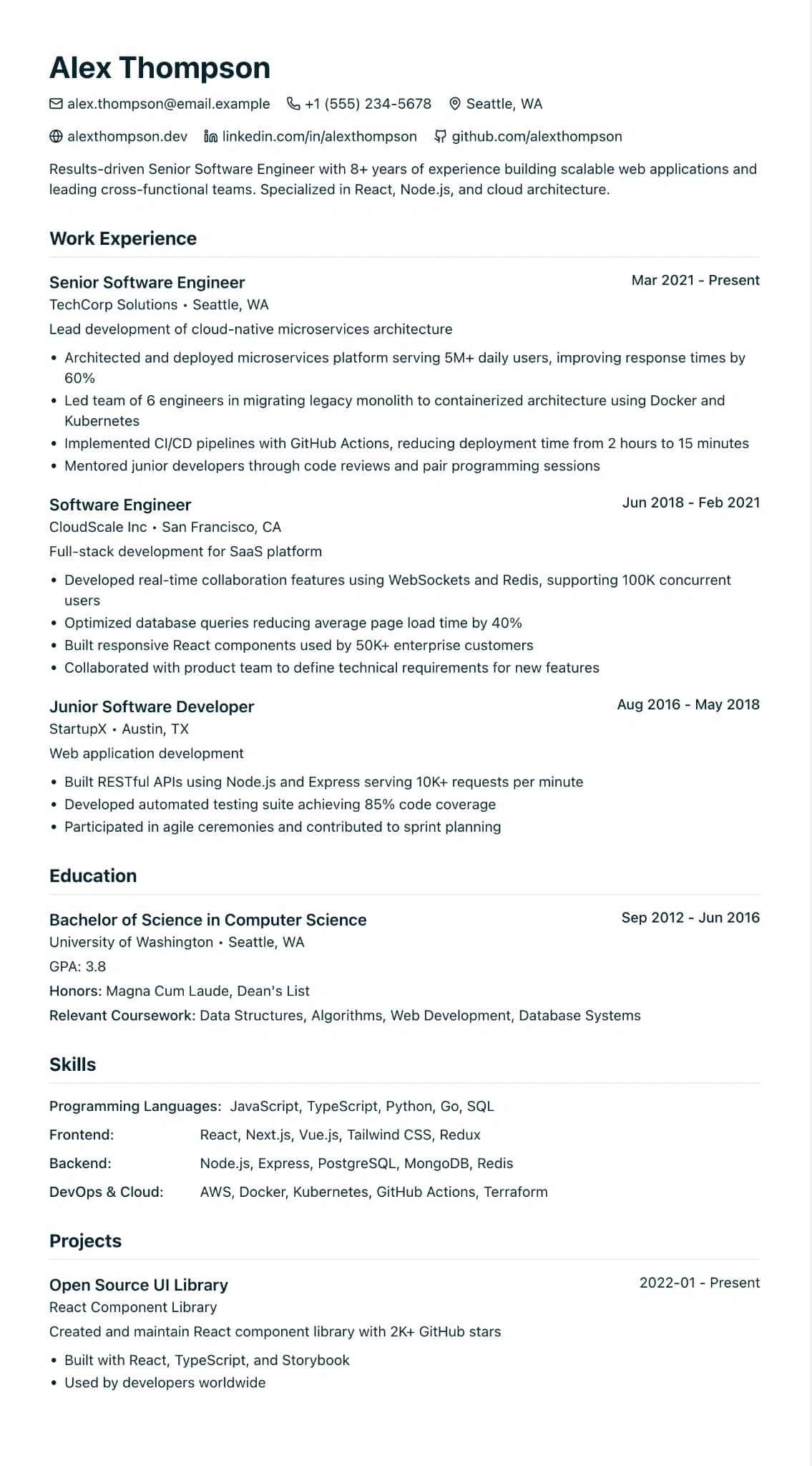
ATS parsers look for labels they recognize. "Professional Experience," "Work Experience," "Education," "Skills," and "Summary" are safe. Creative headings like "Where I've Made Magic," "Toolbox," or "My Story" get skipped, and the bullets underneath them land in the wrong bucket inside the parsed record.
Standard wins. Keep personality in the writing, not in the scaffolding.
// Before (ATS-hostile)
WHERE I'VE MADE MAGIC
Acme Corp | Chief Vibe Officer | 2022–Present

// After (ATS-friendly)
Professional Experience
Acme Corp — Senior Marketing Manager — 2022–Present
Step 3: Pick an ATS-safe font
Use a widely-installed, text-based font: Arial, Calibri, Helvetica, Georgia, Cambria, or Times New Roman. Each maps character-by-character inside a PDF. Decorative, hand-drawn, and icon fonts can trip parsers or appear as blank squares downstream.
Body 10–11pt, headings 12–14pt. Bold role titles; no underline, no all-caps body text, no letter-spacing tricks. If your tool forces a display font on you, switch tools before you switch fonts.
Step 4: Export as a text-based PDF (not an image)
Modern ATS platforms parse text-based PDFs reliably. The failure mode is the image-based PDF, where characters are pixels, not code. Word, Google Docs, LaTeX, and dedicated resume builders keep a real text layer by default.
Step 5: Match keywords from the job description
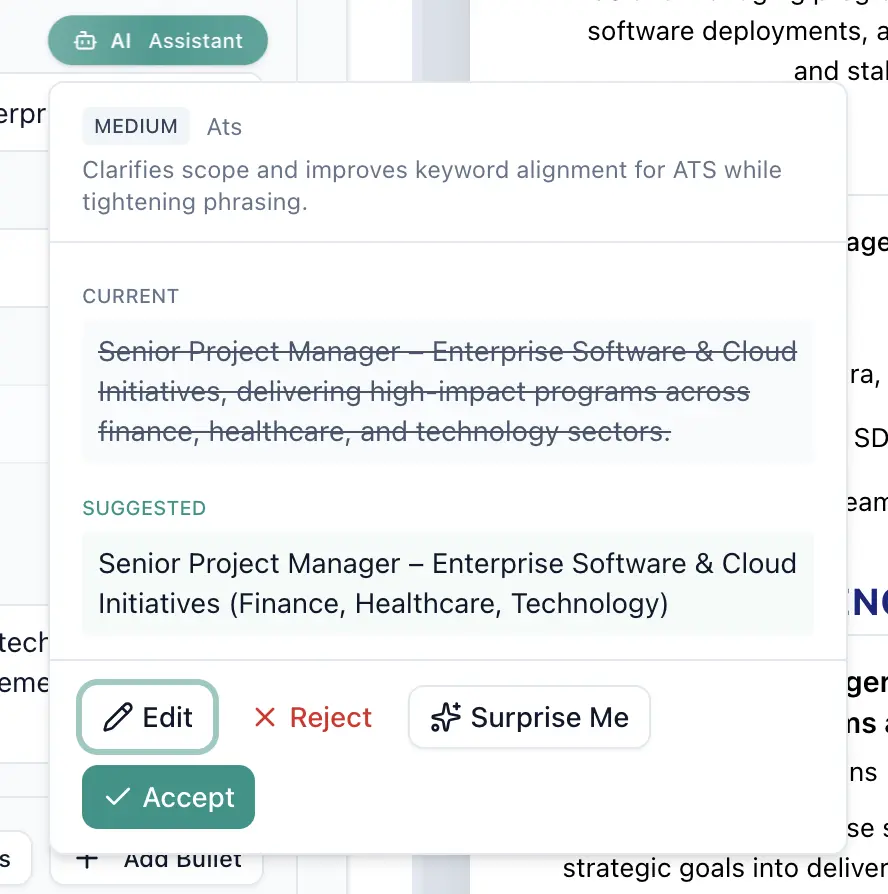
Every job description is also a keyword list. Read the posting, extract every hard skill, tool, certification, and repeated job-title phrase, and make sure the ones you can honestly claim appear in your Skills section, your summary, and naturally inside bullets. LinkedIn's March 2025 Skills-Based Hiring report found hiring for skills is 5x more predictive of performance than credentials, which is why modern ATS screens weigh Skills heavily.
The goal is coverage, not stuffing. If the posting says "SQL, Python, and dashboarding in Looker," include each term where it naturally fits. Our resume keywords guide goes deeper on placement.
Step 6: Use standard bullet characters
Use a round bullet (•) or a plain hyphen (-). Unicode decorations (arrows, checkmarks, stars, custom icons) render inconsistently and sometimes insert stray characters into the parsed output. One style, indented once.
// ATS-friendly bullets
- Led a team of 6 engineers on the migration from Oracle to Snowflake,
  cutting warehouse costs by 38% ($420K annualized).
- Owned quarterly roadmap for the checkout platform (~12M monthly txns).

// ATS-hostile bullets
→ Led an AMAZING team 🔥 on a killer migration that SAVED THE COMPANY
★ Owned the roadmap for checkout (proprietary, can't share numbers)
Step 7: Avoid tables, text boxes, and columns
Layout tables, text boxes, and hidden columns are the most common reasons a clean-looking Word or Canva resume parses into nonsense. The ATS does not know your two-column "Skills | Tools" table is visual. It reads the cells in an order you did not intend. Replace layout tables with inline lists, remove text boxes, and collapse sidebars into a single vertical flow.
Step 8: Spell out acronyms the first time
Recruiters and parsers both index on full terms. Write "SEO (Search Engine Optimization)" or "CRM (Customer Relationship Management)" on first mention, then use the acronym after that. If the job description uses only the acronym, keep the acronym too. Both forms present means keyword searches on either hit.
Step 9: Use reverse-chronological order
Reverse-chronological order (most recent role first) is the format ATS platforms are tuned to. Functional resumes (skills-first, dates-hidden) read as gaps to parsers and as a red flag to recruiters. Career changers and returners are better served by a hybrid: a skills-forward summary at the top, then a conventional reverse-chronological Experience section. The Ladders' eye-tracking study, reported by HR Dive, found recruiters spend an average of 7.4 seconds on the initial scan, anchored on current title and previous role, plus dates and education.
Step 10: Add quantified achievements
A number is an anchor a recruiter remembers in 7.4 seconds and an ATS passes through cleanly. Aim for one concrete metric per bullet where the evidence is honest: revenue, headcount, volume, percent change, timeframe, cost saved.
// Before (vague)
- Responsible for marketing campaigns across multiple channels.

// After (quantified)
- Ran paid search and lifecycle campaigns across 4 channels, lifting
  trial-to-paid conversion from 3.1% to 5.8% over 6 months ($1.2M ARR).
Step 11: Include a skills section with exact keywords
A dedicated Skills section is where the ATS looks first for matches against the job description. Keep it specific and honest. Group hard skills (tools, languages, platforms) separately from soft skills, and use the exact tokens from the posting: "Python" if the job says Python, not "scripting languages"; "Looker" if the job says Looker, not "BI tools."
Harvard Business School and Accenture's Hidden Workers study estimated 27 million US workers are excluded from shortlists because their resumes do not match rigid ATS criteria. A Skills section that speaks the posting's language is the single quickest fix for that gap.
Start from an ATS-parse-tested template
Single-column layout, standard headings, real text layer, and a Skills section designed for exact keyword matching. No watermark on the free tier.
Step 12: Test with an ATS checker before you submit
Parse your own file before a recruiter's system does. Three quick tests. First, the copy-paste test: select all text in the PDF, paste into a plain editor, check the order and legibility. Second, a built-in ATS checker such as SimpleCVBuilder's AI ATS analyzer, which scores keyword coverage and flags formatting issues against the job description you paste in. Third, an independent tool like Jobscan for a second opinion.
SHRM's 2025 Talent Trends survey found that 51% of organizations now use AI specifically for recruiting, up from 26% in 2024, meaning the ATS you are optimizing for increasingly has an LLM screening layer on top of the traditional parser. Checking before you submit is cheap; being silently filtered out is not.
Step 13: Keep it to one or two pages
One page for zero to seven years of experience; two pages once you have genuinely distinct roles worth detailing. Three pages is almost never justified outside academic or research CVs and a handful of executive profiles. ATS platforms parse long files, but the recruiter's 7.4-second scan does not. Cut the oldest role if it adds nothing to the target posting, and consolidate short stints under a clear heading. Drop the "References available on request" line while you are at it; it has been obsolete for a decade.
Step 14: Save with a clean, recruiter-friendly filename
Filename is the one piece of "formatting" that lives outside the PDF and into the recruiter's folder. Export as FirstName-LastName-Role.pdf, for example Maya-Patel-Senior-Data-Analyst.pdf. Avoid resume-final-v4.pdf, MyCV2026.docx, and anything with spaces that ATS portals sometimes mangle. A clean filename is the cheapest credibility signal you can send.
ATS-friendly vs ATS-hostile formatting, at a glance
| Choice | ATS-friendly | ATS-hostile | | --------- | -------------------------------------------------- | ------------------------------------------------- | ------------ | | Layout | Single column, top-to-bottom flow | Two-column with sidebar, text boxes | | Headings | Professional Experience, Skills, Education | Where I've Made Magic, Toolbox, My Story | | Font | Arial, Calibri, Helvetica, Georgia, Cambria | Decorative, hand-drawn, icon-font glyphs | | File type | Text-based PDF (or DOCX if posting requires) | Image-based PDF, scanned PDF, JPG | | Bullets | Round (•) or hyphen (-), one indent | Arrows, stars, emojis, mixed styles | | Dates | MM/YYYY – MM/YYYY, reverse-chronological | Years only, or functional with no dates | | Keywords | Exact match to job description in Skills + bullets | Synonyms only, or stuffed invisibly in white text | | Tables | None for layout; short lists only | Layout tables for "Skills | Tools" grids | | Photo | None for US/UK/CA/AU roles | Circular avatar inside a parsed content block | | Filename | FirstName-LastName-Role.pdf | resume-final-v4.pdf, MyCV2026.docx |
A note on 2026 ATS behavior
The old ATS was a keyword-matching engine. The 2026 ATS is a keyword-matching engine with an LLM on top. Gartner's October 2025 analysis found that 82% of HR leaders plan to deploy agentic AI inside 12 months, meaning more pipelines now use an AI layer to read, summarize, and rank parsed resumes before a human sees them. That shifts strategy in two ways. First, keyword stuffing gets punished, because the LLM sees repetition in context and flags it. Second, plain, quantified language gets rewarded, because the LLM can summarize it confidently for the recruiter. Write for a smart reader who has three seconds of patience and an unforgiving parser underneath. Our ATS guide and ATS resume checker guide cover the scoring side in more depth.
When to break these rules
Every rule above is a default for online applications at scale. Three situations justify bending them.
Senior and executive roles reached via direct introduction. If a search firm, board contact, or hiring manager is opening your PDF personally, a two-column design with a photo and a portfolio link is fine. The ATS is not the gatekeeper; a human is. Many senior candidates maintain two versions: a parse-first PDF for portals and a design-forward PDF for intros. Our ATS CV builder guide covers the parallel workflow.
Creative and design roles where the resume is the sample. For design and brand work, including front-end creative, your resume is a work sample. Typography, layout choices, and a single restrained visual flourish are legitimate signals. Keep the text layer real, keep the layout readable, and ship a plain-text version for the ATS portal alongside the designed PDF.
Academic and research roles. Academic CVs run three to ten pages, use publication lists, and follow their own conventions. ATS rules in their full form do not apply, though the parseable-text-layer rule still does.
For everything else (online portals, large employers, agency pipelines, campus recruiting), parse-first is the default. A clean single-column resume built from a LaTeX ATS template or the Minimalist ATS template will carry you further than a visually ambitious design the parser cannot read. If you want an AI assist on the keyword side while keeping the structure clean, our AI resume builder is built for exactly this pairing.
Frequently asked questions
What is an ATS-friendly resume?
An ATS-friendly resume is one that an Applicant Tracking System — Workday, Greenhouse, Lever, iCIMS, or Taleo — can parse without errors into structured fields like name, title, dates, skills, and bullet points. It uses a single-column layout, standard section headings, a plain common font, real text rather than images, and keywords drawn from the job description. The file opens as a text-based PDF so both the ATS and the recruiter see the same content.
Is a PDF or DOCX better for ATS?
Both work if they contain a real text layer. Modern ATS platforms — Workday, Greenhouse, Lever — parse text-based PDFs reliably. DOCX is marginally safer with older or lightly configured systems, but PDF preserves formatting across recruiters' devices. The failure mode to avoid is an image-based or scanned PDF, which any ATS will misread. If a job posting specifies DOCX, follow the posting. Otherwise, a text-based PDF is the standard default in 2026.
How many keywords should I include?
Include every hard skill, tool, and job title that appears in the job description and that you can honestly back up with evidence. There is no magic keyword count. What matters is coverage: the keywords the recruiter will scan for on the top third of the page and inside the Skills section should also appear naturally in your bullets. Keyword stuffing — the same term repeated five times in white text — gets flagged by modern LLM screening layers that sit on top of the traditional ATS.
Should I use a photo on an ATS resume?
For US, UK, Canadian, and Australian job markets, no. Photos are not parsed, they bias screeners, and they can cause US hiring-compliance issues. For Germany, France, Japan, and parts of Southeast Asia, a professional photo is still conventional — but place it outside the parsed content area and never as the only version of your name. In any market, a separate LinkedIn profile photo is doing the work a resume photo used to.
Do tables and columns break ATS parsing?
Often, yes. Two-column layouts, text boxes, and tables used for visual layout are the three formatting choices most likely to scramble parsing in Workday, Greenhouse, Lever, iCIMS, and Taleo. Single-column layouts with real section headings parse cleanly. A quick test: open your PDF, select all, paste into a plain text editor. If the order is wrong or words are interleaved, the ATS sees the same chaos.
Can I break these rules for creative or senior roles?
Yes, with caveats. If you are referred directly to a hiring manager, applying through a boutique recruiter, or submitting a creative portfolio where a human opens the file first, a two-column design or a PDF with visual polish is fine. For online portals at scale — large employers, agency pipelines, campus recruiting — the ATS is the gatekeeper, so a parse-first design protects you. Many senior candidates keep two versions: an ATS-friendly PDF for portals and a design-forward PDF for direct intros.
How do I test whether my resume is ATS-friendly?
Two quick checks and one real one. First, select all the text in the PDF and paste it into a plain text editor — the output should read top to bottom in the right order, without garbled characters. Second, upload the file to an ATS checker such as SimpleCVBuilder's built-in AI ATS analyzer or an independent tool like Jobscan to see keyword coverage and formatting flags. Third, whenever possible, submit through a test ATS portal — many Greenhouse and Lever pipelines let you preview the parsed fields before you apply.
What is the #1 mistake that breaks ATS parsing?
Text saved as an image. Resumes exported from Canva or Photoshop often embed text inside graphics, which the ATS reads as a single picture with no content. The result looks perfect to you and blank to the recruiter. Always export from a tool that keeps a real text layer, and verify by copy-pasting the text out of the PDF before you submit.