
Career Changer CV template
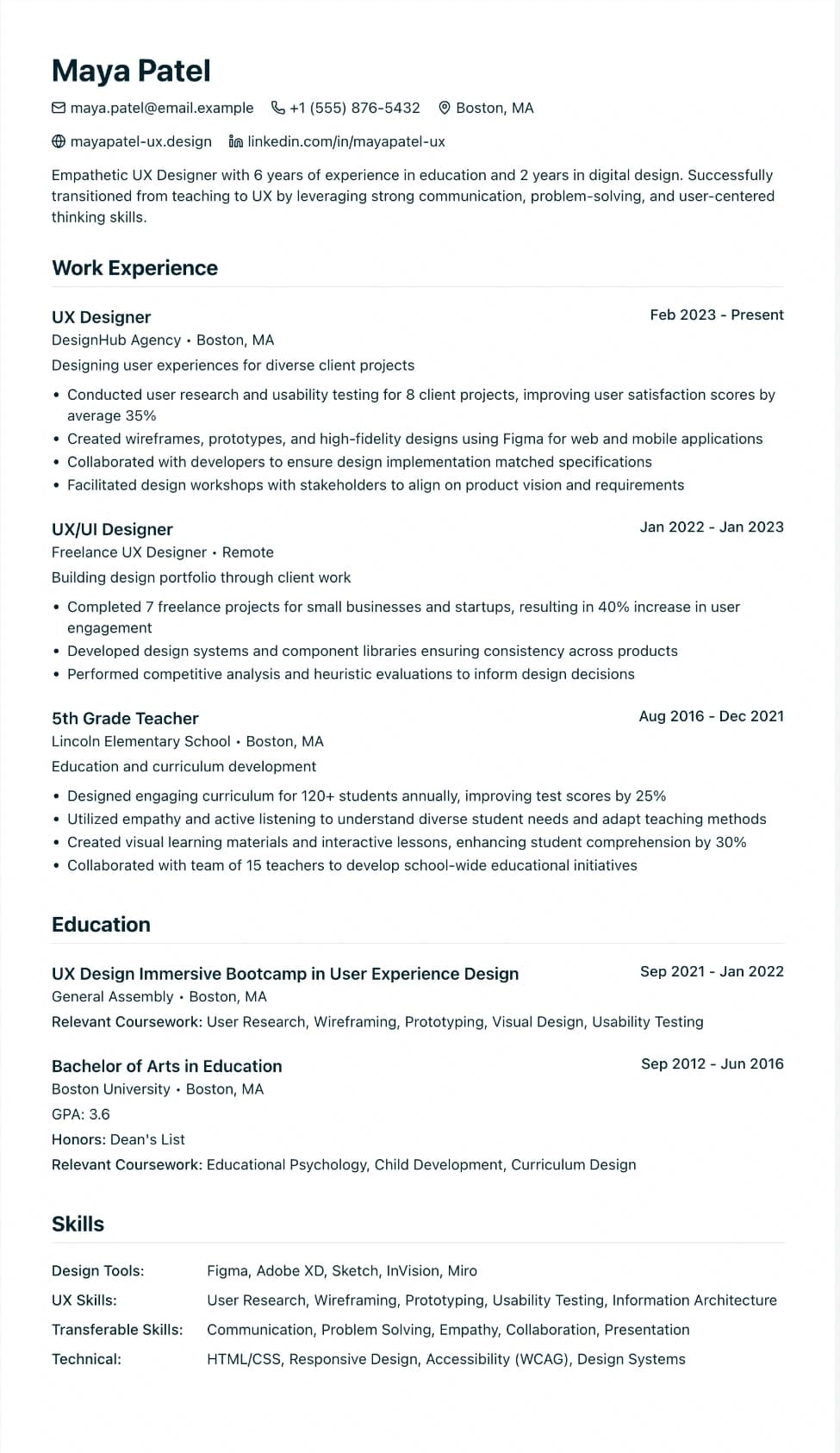
A one-column design with larger headings, for CVs that lead with transferable skills.
Best for:
- Career Changers
- Industry Switchers
- Recent Graduates
A Pro design, also included in the 7-day trial and the 30-day Pass. The free plan includes Modern Professional, International Student, Education & Teaching. See plans
No watermark on the PDF, on any plan
Who this design is for and why
Career Changer is for people whose best evidence for the next job sits in their skills and training rather than in their last job title. The design is one column with a muted blue accent. Section headings are a size larger than in our other one-column designs, and there is more space between sections, so a reader can see at a glance where your skills end and your job history begins.
The layout does not force an order on you. The usual approach for a change of career is a short summary that names the job you want, then a skills section grouped by what the new role asks for, then any recent course or qualification, with your employment history last. You can drag sections into that order on the canvas. Because it has no sidebar, no photo and no tables, screening software reads it in the order you set, which matters when you apply for roles where you have no direct experience and the keywords have to do the work. Pair it with the tailor tool to check your CV against a real job advert before you send it.
How the layout works
Career Changer gives headings more weight than our other one-column designs: they are a size larger, with a thicker, lightly tinted rule underneath, and job titles pick up the accent colour. That matters when your sections come in an unusual order, because a reader needs to see straight away that skills sit before history on purpose.
Who it suits, and who should pick another design
- Teachers moving into training, HR or learning design: planning sessions and assessing progress translate into skills a corporate panel recognises.
- Armed forces leavers: rank and unit names mean little to most civilian recruiters, so describing the work in plain terms first helps.
- Shop and hospitality managers heading into office or operations work: rota planning, stock control and handling complaints sit naturally in a skills section.
If your next job is in the same field as your last, a skills-first page can look evasive; Modern Professional, led by experience, is the better fit. It also needs real evidence under each skill. A list of single words under big headings makes the page look thin.
How application systems read it
It is one column of text with standard headings, so applicant tracking systems read it in the order you set. With skills placed first, the words a job advert uses appear near the top of the page, inside sentences that show where you used them. The Word download on Pro, the trial or the Pass keeps that same order as ordinary paragraphs.
What to put in each section
- Profile: the job you want and why you are moving, in two or three sentences.
- Skills: three or four groups that match the advert, each with a line of evidence.
- Training: a recent course or qualification with dates, as a custom section or under education.
- Experience: earlier jobs last, with bullets rewritten around the skills that carry over.
A worked example
Marcus Brown taught secondary science for eight years and now wants a learning and development role. His profile says so in one line. Three skill groups follow: "Designing training" (schemes of work, a Year 11 revision programme), "Coaching" (mentoring two trainee teachers) and "Data" (tracking progress across six classes). A CIPD course in progress sits under "Training", and his teaching posts come last, with the same evidence told from the classroom side.
Common mistakes with this layout
- Listing skills with no proof. "Communication" alone tells a reader nothing; one line on where you used it does.
- Telling the whole story in the profile. Two sentences will do; keep the rest for the cover letter.
- Dropping old job titles to hide the change. Recruiters notice gaps, so keep the titles and rewrite the bullets.
Switching to another design
You can switch to any other one-column design and your section order comes with you, so many people draft here and move to Modern Professional once the new job is on the CV. Career Changer is a Pro design: free accounts see it in the switcher, and choosing it opens the upgrade options.
Every design downloads as a PDF that matches the editor page for page, with no watermark on any plan. This one needs Pro, the 7-day trial or the 30-day Pass, which also add Word and plain text downloads. See pricing
See this design in use
- Engineering CV templates and an example, where this design is one of our three picks
Read the guide
How to write the CV this design is built for: Career Change Resume: Pivot Industries.
Start your CV in Career Changer
Sign up free. No credit card required. You can switch design at any time in the editor.