
Education & Teaching CV template
A one-column design for teachers and school staff. One of the three designs on the free plan.
Best for:
- Teachers
- Educators
- Academic Roles
- School Administrators
On the free plan: build this CV and download it as a PDF without paying. Free accounts get 1 CV and 1 free PDF download per CV.
No watermark on the PDF, on any plan
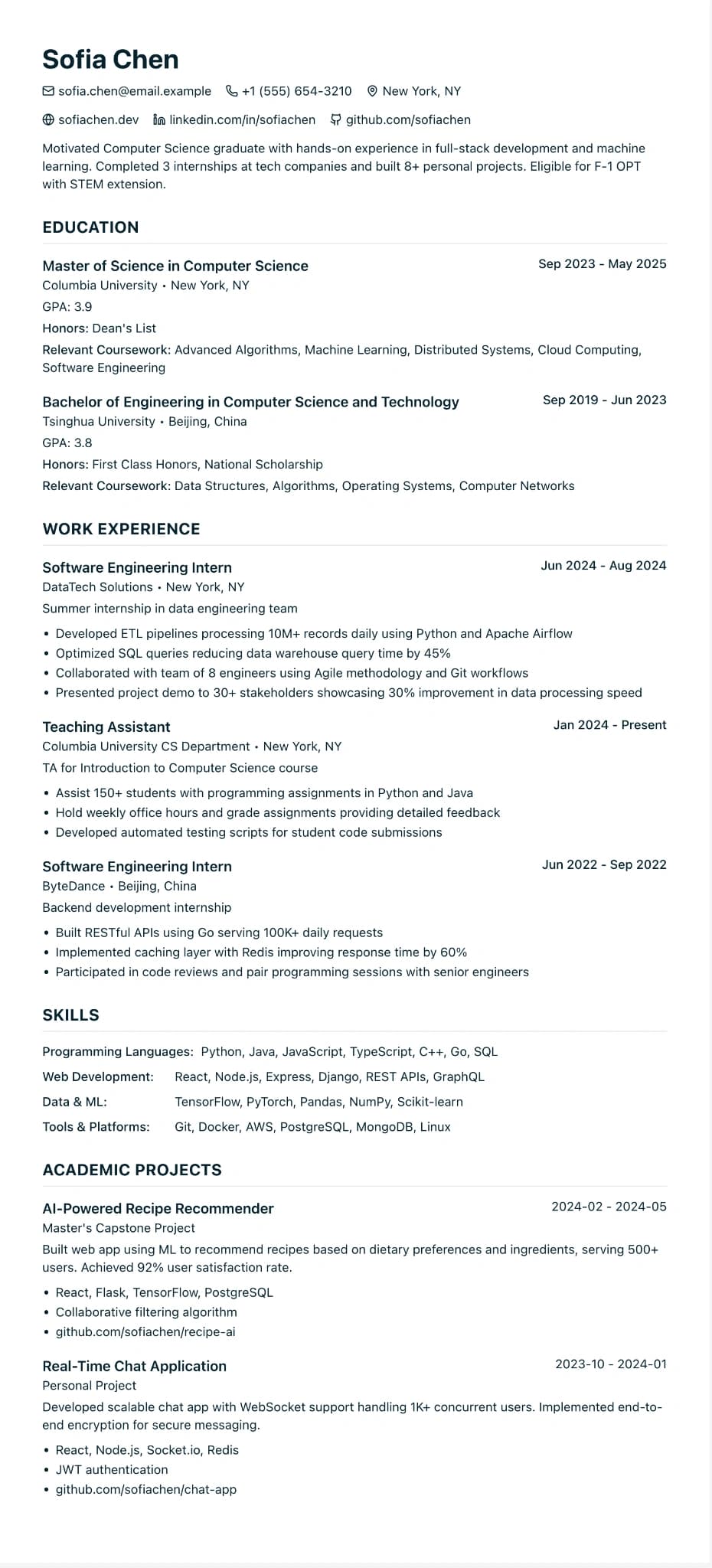
Who this design is for and why
Education & Teaching is a free design for teachers, teaching assistants, lecturers and school support staff. It is one column with a green accent, section headings in capitals and small icons on the contact line. It shares its structure with International Student, which suits education CVs because qualifications usually come first.
Start with your degree, your teacher training route, QTS or its equivalent, and the key stages or subjects you are trained to teach. After that, list your posts with the type of school, the year groups you taught and what changed for your classes, then any leadership, safeguarding or SEND training. Many state schools ask for an application form rather than a CV, so use this design for supply agencies, independent schools, colleges, universities and the roles that do ask for one, and keep it open as your source when you fill in a form. Because the design is on the free plan, you can build it and download it as a PDF without paying, and the file has no watermark.
How the layout works
Education & Teaching shares its structure with International Student, because both are CVs where qualifications come first. The difference is the audience: a deeper green, and section guidance written for people already working in schools, colleges and universities rather than for graduates.
Who it suits, and who should pick another design
- Primary and secondary teachers: independent schools, supply agencies and the academies that accept CVs want QTS and key stages up front.
- Teaching assistants and SEND support staff: training and the year groups you have supported matter most, and they sit near the top.
- Further education lecturers and tutors: subject qualifications and teaching experience sit side by side.
Senior academics with long publication lists need a full academic CV with its own conventions. Teachers leaving the classroom for another sector should look at Career Changer, which leads with transferable skills.
How application systems read it
School groups, trusts and supply agencies that use applicant tracking software will read this design top to bottom without surprises. The bigger risk is jargon: spell terms out once, such as "Qualified Teacher Status (QTS)" and "special educational needs and disabilities (SEND)", so a search for either form finds you.
What to put in each section
- Qualifications: degree, training route and QTS with the date awarded.
- Teaching experience: each school with its type, the subjects or key stages and one or two outcomes.
- Training: safeguarding, SEND and subject courses with dates.
- Responsibilities: a custom section for roles such as head of year, trips or clubs.
A worked example
Grace Bennett is a primary teacher with four years in a two-form entry school, applying to a supply agency and two independent schools. Her CV starts with her BA, PGCE and QTS. Her teaching post gives the year groups she taught and one result each, such as the phonics programme she led in Year 1. Safeguarding training and a maths mastery course follow, then "Responsibilities" for the after-school science club she runs.
Common mistakes with this layout
- Sending a CV when the school asked for its application form. Use the form, and copy from your CV.
- Naming pupils or giving details about them. Describe groups, not children.
- Leaving the date off safeguarding training. Schools check that it is current.
Switching to another design
Free accounts can move between this, Modern Professional and International Student whenever they like. If you later leave teaching, try Career Changer on Pro, the trial or the Pass; your qualifications and posts carry over and only the order needs rethinking.
Every design downloads as a PDF that matches the editor page for page, with no watermark on any plan. This one is on the free plan, which includes one free PDF per CV; Word and plain text downloads come with Pro, the 7-day trial and the 30-day Pass. See pricing
See this design in use
- Academic CV example (postdoc to lecturer), a full example CV built on this design
- Teacher CV example for secondary schools in England, a full example CV built on this design
- Teaching assistant CV example, a full example CV built on this design
- Civil service CV templates for public sector jobs, where this design is one of our three picks
Start your CV in Education & Teaching
Sign up free. No credit card required. You can switch design at any time in the editor.