
Freelancer Portfolio CV template
A centred header and roomy entries, for CVs built around clients and projects.
Best for:
- Freelancers
- Consultants
- Contract Workers
A Pro design, also included in the 7-day trial and the 30-day Pass. The free plan includes Modern Professional, International Student, Education & Teaching. See plans
No watermark on the PDF, on any plan
Who this design is for and why
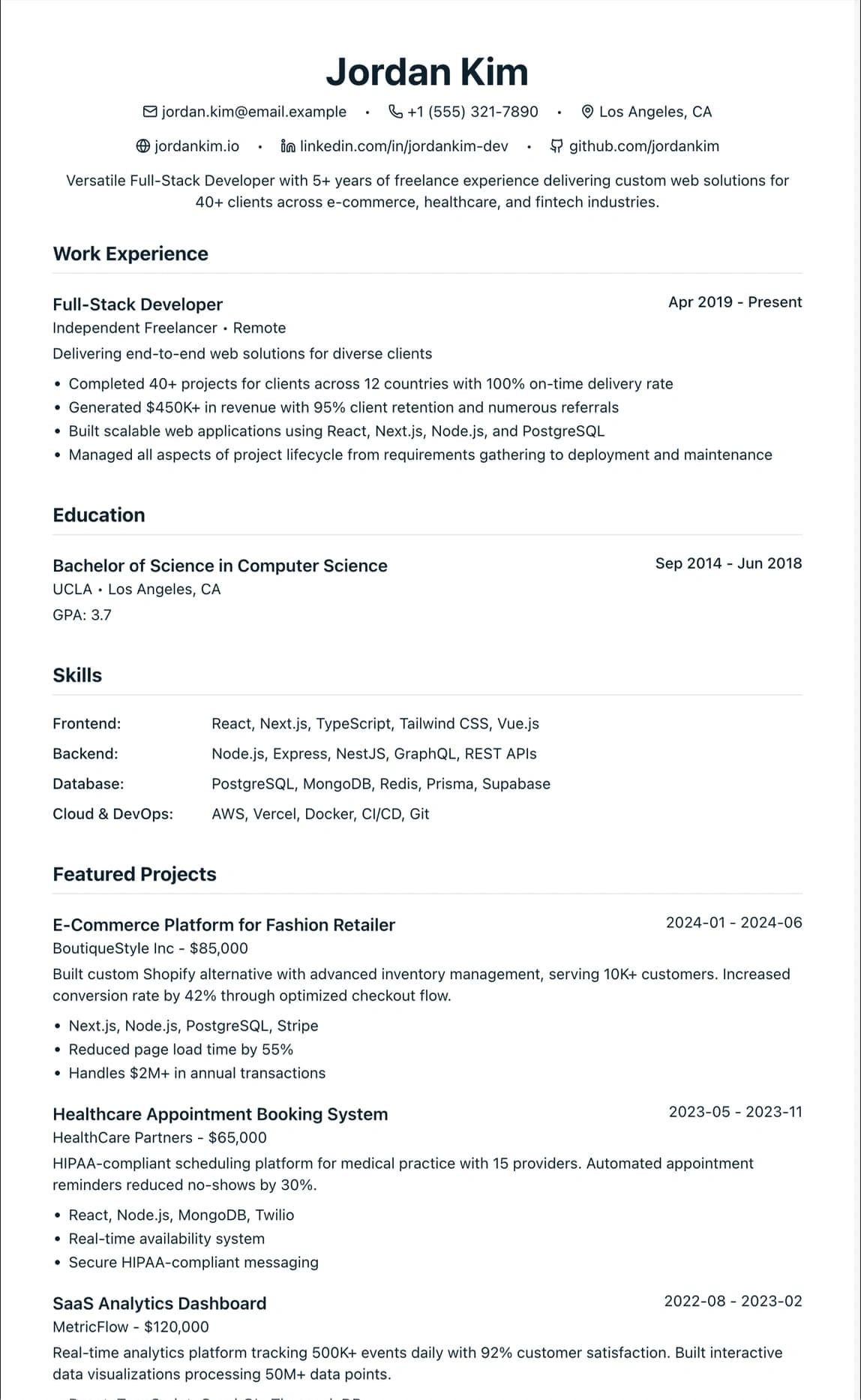
Freelancer Portfolio is built for people who work project by project: contractors, consultants and freelancers who need to show a run of clients rather than one employer. Your name is centred at the top and set larger than in any other design, with your headline and contact details centred underneath, so the header reads like a title block. The accent colour is purple by default, and you can change it.
The page is one column with extra space between entries, which gives each project room for a client name, dates and two or three results. A practical way to use it: list your main client engagements as experience entries, group short jobs under one entry such as "Freelance projects, 2022 to 2025", and put your tools and specialisms in the skills section. Put a link to your portfolio or published work on the contact line, where a recruiter will look for it. It has no sidebar and no photo, so it stays readable when a recruitment agency loads your CV into its own system before a person sees it.
How the layout works
A freelance CV lacks the thing a standard layout leans on: one employer to anchor each entry. This design puts the weight on you instead. The large centred name and headline work like a title page, and sections are divided by space rather than ruled lines, so each block of projects reads on its own.
Who it suits, and who should pick another design
- IT, engineering and project contractors: you move between clients every few months and need to show the run of engagements.
- Writers, designers and photographers: the portfolio link matters as much as the CV, and the contact line gives it room.
- Consultants and interim managers: the client list and what changed for each client are the selling point.
If you have had one or two permanent employers, the centred header adds little and Modern Professional reads more conventionally. Contractors whose CVs go straight into agency databases may prefer Minimalist ATS, which has no icons at all.
How application systems read it
One column of text means applicant tracking systems and agency databases read your projects in order. The centred header is still plain text, and the contact icons sit beside the text rather than replacing it. Some agencies reformat a CV before a client sees it; the Word download on Pro, the trial or the Pass gives them editable paragraphs to work from.
What to put in each section
- Headline: your trade and specialism, such as "Freelance UX writer, fintech and public services".
- Profile: what you do, for which kind of client, and how you like to work.
- Experience: one entry per main client, plus a grouped entry for short jobs, each with its result.
- Skills: tools and specialisms in short groups.
A worked example
David Chen is a freelance web developer with seven years of client work. His headline reads "Freelance front-end developer, React and accessibility". Instead of thirty small jobs, he lists five longer engagements, each with the type of client, the dates and two results, and gathers everything else under "Smaller projects, 2019 to 2025". His portfolio link sits on the contact line beside his email address.
Common mistakes with this layout
- Listing every gig. Ten one-week jobs make a long, thin CV; group them.
- Naming clients covered by a confidentiality agreement. Describe them instead, such as "a UK high street bank".
- Leaving out dates. Contract recruiters check continuity, so give the month and year for each engagement.
Switching to another design
If you take a permanent job, switch to Modern Professional or Career Changer: your entries come across as they are, so a client list becomes a job history without retyping. Freelancer Portfolio is a Pro design.
Every design downloads as a PDF that matches the editor page for page, with no watermark on any plan. This one needs Pro, the 7-day trial or the 30-day Pass, which also add Word and plain text downloads. See pricing
See this design in use
- Creative CV templates and a designer example, where this design is one of our three picks
Read the guide
How to write the CV this design is built for: Freelancer Resume Without a Job History.
Start your CV in Freelancer Portfolio
Sign up free. No credit card required. You can switch design at any time in the editor.