
LaTeX ATS Professional (Colour) CV template
The typeset LaTeX layout with one accent colour for your name and section headings.
Best for:
- Software Engineers
- Tech Startups
- Technical Professionals
- Modern Companies
A Pro design, also included in the 7-day trial and the 30-day Pass. The free plan includes Modern Professional, International Student, Education & Teaching. See plans
No watermark on the PDF, on any plan
Who this design is for and why
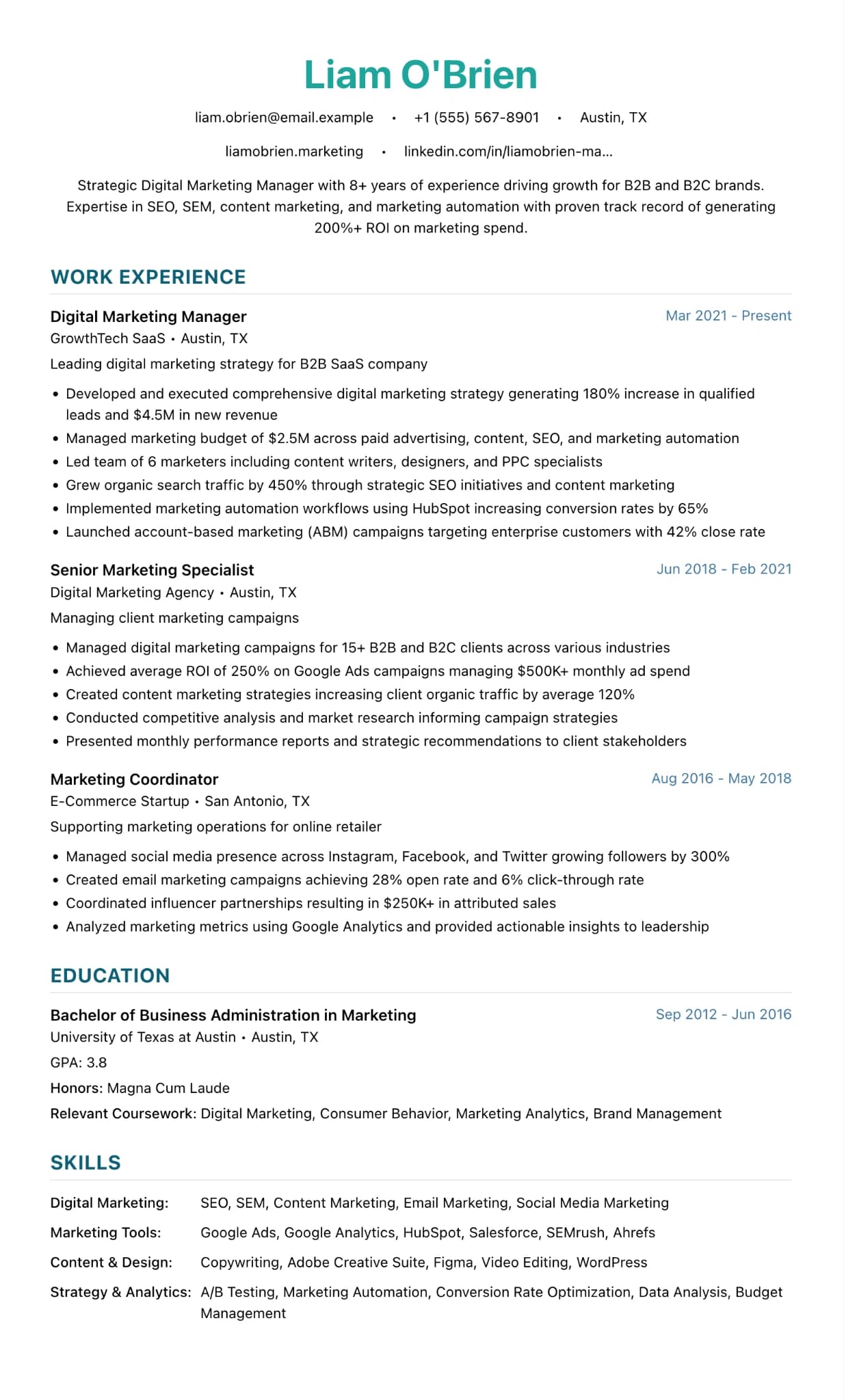
LaTeX ATS Professional (Colour) keeps the typeset layout of the monochrome version and adds one colour. Your name and section headings are teal by default and the rest of the text stays black. Sizes follow LaTeX conventions: a 28pt name centred at the top, 14pt headings in capitals and 10pt body text. There are no icons, no sidebar and no photo, so it is still one column of plain text that screening software reads in order.
The colour helps a reader find their place on a dense page. It works well for engineering firms, tech companies and other employers where a slightly more modern look is welcome but a two-column design would be a risk with their application system. You can change the accent to navy, grey or any colour you like in the editor, and the page still reads well if an employer prints it in black and white. Choose this over the monochrome version when your CV will mostly be read on screen, and choose the monochrome one when you know it will be printed or when the sector is conservative.
How the layout works
This is the LaTeX layout with three small changes: your name is set in teal, section headings are deep teal with a thicker coloured rule beneath, and small labels take a muted blue. Point sizes and the half-inch margins match the monochrome version exactly.
Who it suits, and who should pick another design
- Engineers and developers at start-ups and product companies: a touch of colour looks current without looking designed.
- Data analysts and scientists: a dense page that still looks fresh when it is read on screen.
- Engineering graduates applying to consultancies and manufacturers: the CV is often read on screen first and printed later for the panel.
Banks, law firms and other conservative employers may read colour as informal, so send them the monochrome version. With a short CV, the coloured headings draw attention to how little sits under them.
How application systems read it
Colour makes no difference to an applicant tracking system, which reads only the words. The structure is the same single column as the monochrome version, with no icons, tables or sidebar, so parsing behaves the same way. On a black and white printout the teal headings turn grey and stay legible, because they are bold capitals.
What to put in each section
- Headline: the 13pt line under your name: role and level, such as "Mechanical design engineer, chartered".
- Experience: employer and dates on one line, then three or four bullets with figures.
- Projects or publications: a custom section with one line per item.
- Skills: CAD, simulation and programming tools in short groups.
A worked example
Aisha Mohammed is a mechanical design engineer applying to an electric vehicle start-up. Her name and headings come out in teal and everything else in black. Each of her two roles carries four bullets on parts she designed and tests she ran, a "Projects" section covers her final-year Formula Student car, and her skills keep CAD (SolidWorks, CATIA) apart from analysis (ANSYS, MATLAB).
Common mistakes with this layout
- Switching the accent to something bright. The headings are big and bold, and a vivid colour overpowers a dense page.
- Using the colour version everywhere. Send the monochrome one when you know the reader is conservative.
- Filling every line because the type is small. White space still helps a reader find the next role.
Switching to another design
The monochrome LaTeX ATS Professional is one click away and keeps every line where it is, since the two share their layout and sizes. Or keep this design and change the accent in the design panel: navy or dark grey gives it a more formal tone.
Every design downloads as a PDF that matches the editor page for page, with no watermark on any plan. This one needs Pro, the 7-day trial or the 30-day Pass, which also add Word and plain text downloads. See pricing
See this design in use
- Engineering CV templates and an example, where this design is one of our three picks
Read the guide
How to write the CV this design is built for: ATS CV Builder: Beat the ATS in 2026.
Start your CV in LaTeX ATS Professional (Color)
Sign up free. No credit card required. You can switch design at any time in the editor.